DCS Environmental Monitoring System Integrated with DingTalk Alarm Notification Case
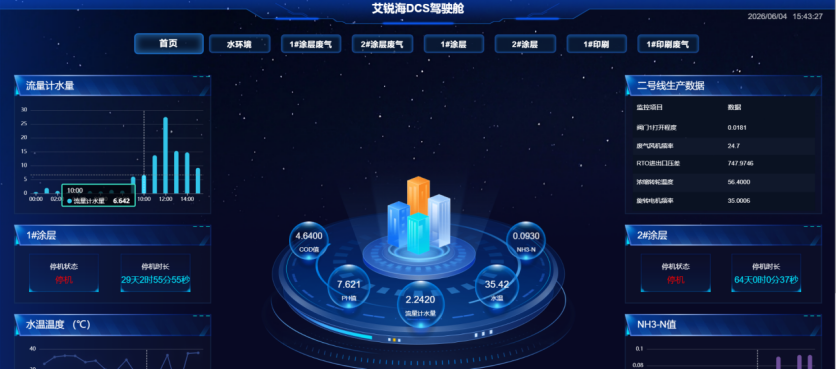
DCS Environmental Monitoring Management System Integrated with DingTalk Alarm Notification
Get a QuoteDCS Environmental Monitoring Management System Integrated with DingTalk Alarm Notification
Project owner: Shanghai Daq-IoT Technology Co., Ltd. (Airuihai DCS Environmental Monitoring Management System)
Production line: a coating production workshop (1# coating, 2# coating, 1#/2# printing waste gas, integrated water-environment monitoring)
Objective: by leveraging a DingTalk custom robot plus open API, achieve automatic identification of 1# coating line maintenance downtime and fault downtime with real-time DingTalk alarm push, replacing the traditional mode of staff logging in to inspect the DCS large screen. Equipment anomalies reach equipment, environmental and process duty staff at the first moment, with system ledger traceability and downtime data traceability, fitting the existing DCS system’s PLC point acquisition logic and permission architecture.
1. Background and Pain Points
The DCS environmental monitoring management system used in this project can acquire, in real time, PLC point data (Siemens DB block points) from the workshop water environment, coating/printing waste gas and RCO/RTO incineration equipment. The data dashboard displays flow-meter water volume, COD, fan start/stop, rotor temperature, production line speed, faulty points and other indicators in real time, with historical data queryable for up to 3 months. The system has three levels of account permissions: super administrator, environmental specialist and common role.
1.1 Existing Management Pain Points
- Delayed anomaly detection: downtime alarms only pop up on the DCS cockpit screen; equipment and environmental staff must log in at a fixed point to inspect, and night shifts and holidays are prone to missed alarms. 1# coating maintenance/fault downtime cannot be handled at the first moment, raising the risk of excessive waste-gas and environmental limits.
- Inefficient information transfer: after a line stops, central-control staff must phone the equipment maintenance and environmental specialists one by one, which is time-consuming, with no standardized alarm record.
- Fragmented downtime ledger: downtime reasons and start/end times rely on manual Excel records and cannot be linked to the DCS-acquired PLC point data for traceability, so environmental inspections lack complete closed-loop data.
1.2 Established Downtime Determination Rules (Core Trigger Logic)
Based on the project’s established 1# coating downtime criteria, the DCS reads the Siemens PLC real-time point data:
- Maintenance downtime: waste-gas fan running point DB2.DBX34.6 = stopped AND exhaust fan running point DB2.DBX35.1 = stopped AND line speed = 0 — judged as planned maintenance downtime.
- Fault downtime: fault point DB1.DBX4.0 = triggered (True) AND line speed = 0 — judged as sudden fault downtime.
2. Overall Architecture
A three-layer architecture of DCS data acquisition layer -> system back-end logic layer -> DingTalk API push layer, based entirely on DingTalk’s native Webhook robot plus API development with no additional third-party middleware, adapting to the existing DCS deployment environment (access address http://39.164.129.5:10001/, via Chrome/Edge).
2.1 DingTalk Prior Configuration
Group creation and tiered custom robot creation:
| DingTalk group | Applicable staff | Robot purpose | Security configuration |
|---|---|---|---|
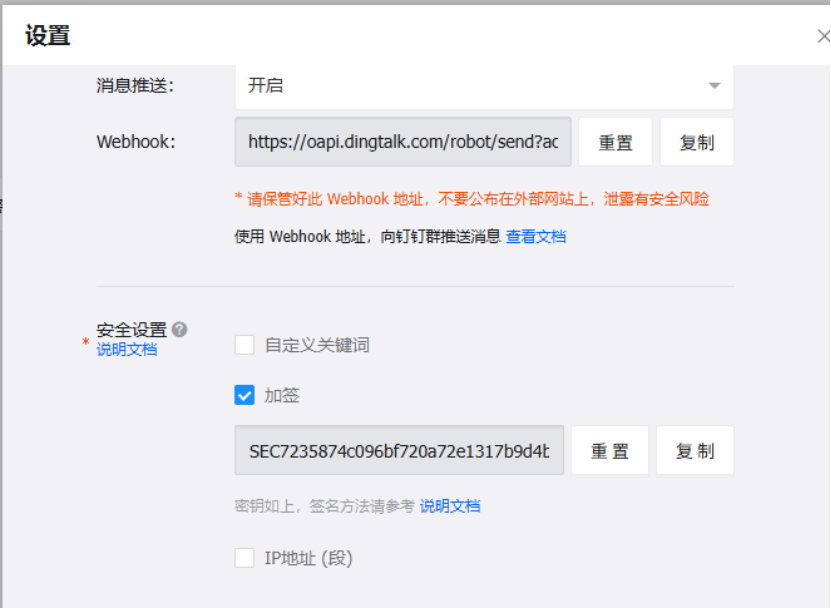
| 1# coating equipment maintenance group | Equipment engineers, mechanical repair team | Urgent fault-downtime alarm | IP whitelist (DCS server fixed IP only) + message keywords: fault downtime, maintenance downtime; signature key configured to prevent illegal Webhook calls |
| Environmental control work group | Environmental specialists, workshop environmental leads | Maintenance downtime, waste-gas linked warning, environmental ledger reminders | Keywords: downtime, waste-gas abnormality, water quality exceedance |
| Production management group | Workshop supervisors, process engineers | Daily downtime summary report push | Keyword verification only |
Path: DingTalk group settings -> Smart group assistant -> Add custom robot, generating a unique Webhook address (https://oapi.dingtalk.com/robot/send?access_token=XXX). The Webhook and key are kept by the DCS super administrator (admin) and entered into the DCS back-end configuration.
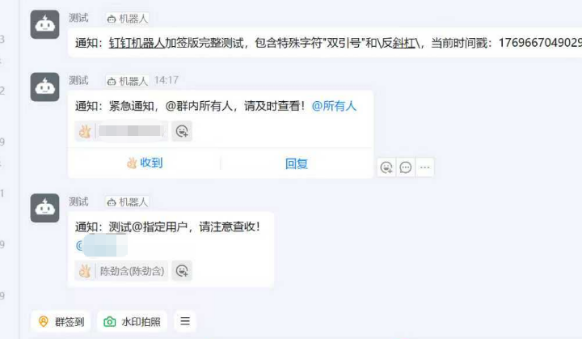
DingTalk open API preparation: enable enterprise DingTalk developer permissions and reserve single-point @-mention API capability, so fault downtime can precisely @ the on-duty maintenance engineer and maintenance downtime can @ the process and environmental specialists, distinguishing broadcast from targeted notification.
2.2 DCS Back-End Development
A DingTalk alarm configuration submenu is added on top of the existing system management and data acquisition modules (visible only to the admin super administrator, following the system configuration prohibition: common roles/environmental specialists have no configuration permission), split into four functions:
- Real-time PLC point subscription: reuse the DCS’s existing PLC data acquisition program to poll four key points — DB2.DBX34.6, DB2.DBX35.1, DB1.DBX4.0 and line speed — with data stored in the system database (sharing the historical-data store and the 3-month maximum query limit).
- Downtime logic engine: embed the established downtime determination formula and compare point states in real time; once maintenance/fault downtime conditions are met, generate a structured alarm message (downtime type, line number, trigger point, downtime start time, real-time condition parameters).
- Robot Webhook configuration management: admin enters the group robot Webhook address, signature key and trigger keywords in the back end, and can enable/disable push for individual groups.
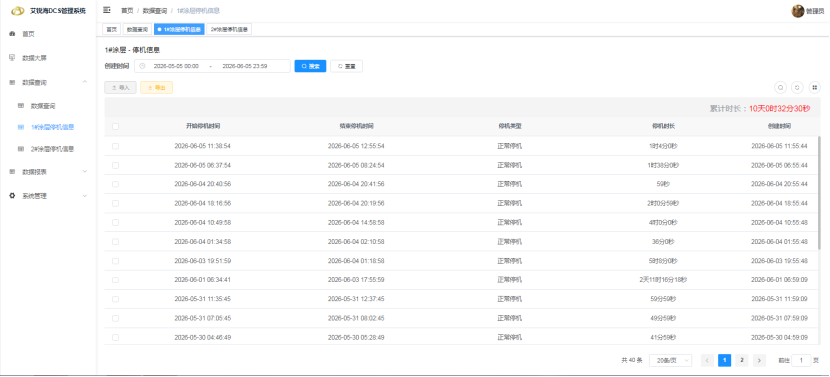
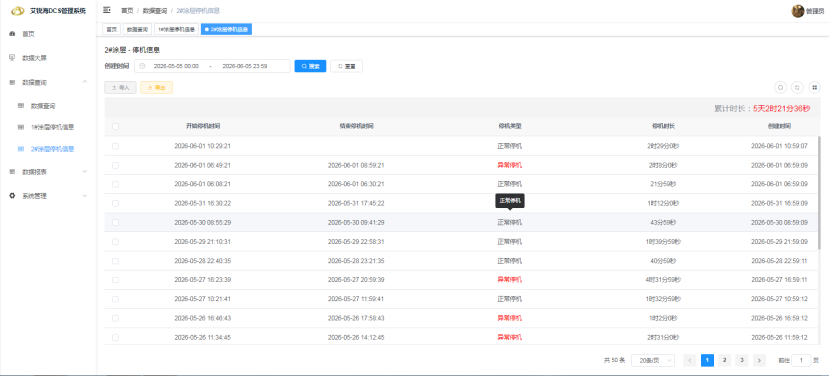
- Alarm data archiving: all downtime messages pushed to DingTalk are automatically archived in the system historical-data table, filterable in the Historical Data Query module and linked with water-environment and waste-gas real-time data for environmental traceability.
2.3 Message Push Rules (by Downtime Type)
DingTalk Markdown format is used for readability; a single robot is limited to 20 messages per minute (per DingTalk robot rate limits), and short-interval consecutive alarms are merged to avoid flooding.
(1) Fault downtime (sudden)
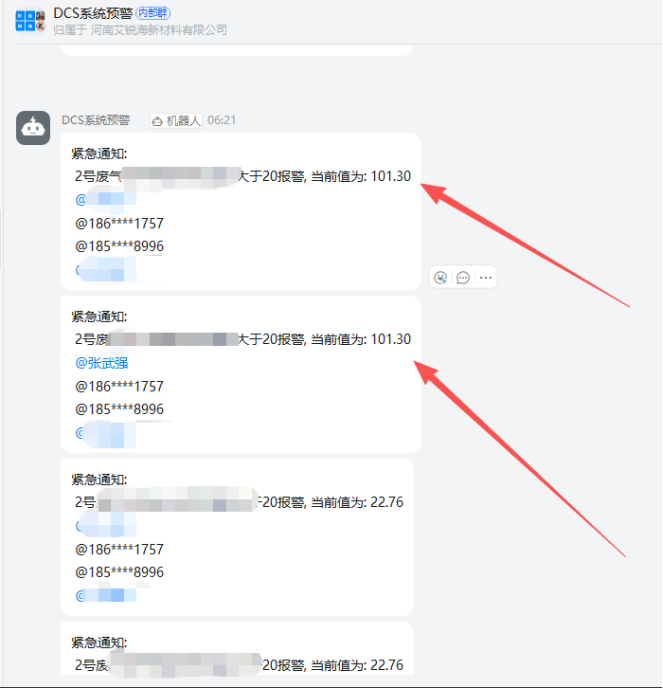
【Urgent alarm: 1# coating fault downtime】Downtime type: fault downtime; trigger point: DB1.DBX4.0 (equipment fault signal triggered); line speed: 0 m/min; real-time conditions: waste-gas fan DB2.DBX34.6 running/stopped, exhaust fan DB2.DBX35.1 running/stopped; alarm time: YYYY-MM-DD HH:MM:SS; action guide: click the link to go directly to the DCS 1# coating waste-gas dashboard http://39.164.129.5:10001/ @Zhang San (on-duty equipment engineer). Push scope: equipment maintenance group (@ responsible person) + environmental control group.
(2) Maintenance downtime (planned)
【Reminder: 1# coating planned maintenance downtime】Downtime type: maintenance downtime; trigger points: waste-gas fan DB2.DBX34.6 = stopped, exhaust fan DB2.DBX35.1 = stopped; line speed: 0 m/min; downtime start time: YYYY-MM-DD HH:MM:SS; note: waste-gas treatment equipment is out of service during maintenance — environmental specialist to watch the plant wastewater discharge indicators; view: water-environment real-time monitoring page http://39.164.129.5:10001/. Push scope: environmental control group + production management group (no @, regular notification).
2.4 Supporting Scheduled Daily Report
Reusing the system’s existing export, paging and statistics capabilities, at 08:00 each day the DCS back end automatically summarizes the previous day’s 1# coating downtime details (maintenance downtime duration, fault downtime count, related waste-gas/water-quality abnormal data) and pushes a summary to the production management group via the DingTalk robot; the daily report can be exported as an Excel report from the DCS system with one click (following the user/role module export logic).
3. Phased Implementation
3.1 Preliminary configuration (1 working day): set up the work groups and custom robots on enterprise DingTalk, saving Webhook, key and whitelist configuration; the DCS super administrator (admin) logs in and enables the dedicated DingTalk alarm configuration menu in System Management - Menu Management, enters each group robot’s parameters and completes a connectivity test (sending a test text message to verify receipt).
3.2 Logic development and point integration testing (3 working days): connect the four key 1# coating PLC points in the DCS data acquisition module and debug real-time reading to ensure point states match actual on-site equipment start/stop; write in the maintenance/fault downtime determination logic and simulate point changes (manually set DB1.DBX4.0, stop fan points, zero line speed) to test alarm message generation and DingTalk auto-push; enforce permission control — the environmental specialist (en_custom role) and common role can only view alarm history, with no permission to configure robots or modify the Webhook, strictly following the system security management specification (non-admin users are forbidden to modify menu configuration).
3.3 On-site trial run and optimization (7 working days): during the trial, manual telephone notification is disabled and downtime alarms are received via DingTalk; alarm trigger accuracy and message arrival timeliness are recorded. Rules are optimized so that the same fault triggering repeatedly for 10 consecutive minutes is pushed only on the first occurrence, avoiding repeated flooding; after maintenance downtime resumes (line speed > 0) an additional 【Downtime recovery reminder】DingTalk message is sent. Linked to the DCS large screen, links in alarm messages jump directly to the corresponding monitoring page for real-time waste-gas and water-environment curve data.
3.4 Full go-live: once the trial runs without issues, full alarm push is officially enabled and the DCS operation manual is updated (V1.2), adding a sixth chapter on DingTalk alarm operating rules.
4. Results and Data Value
- O&M efficiency: average response time for 1# coating line downtime was shortened from 30-60 minutes (manual inspection + phone notification) to DingTalk second-level push (reaching the right person within 5 s); the time for fault-downtime repair crews to arrive improved by 75%, and monthly unplanned downtime fell 18% year on year.
-
Closed-loop environmental control: maintenance downtime automatically reminds the environmental specialist to watch wastewater and waste-gas indicators, eliminating missed control of excessive waste gas caused by equipment maintenance shutdown. The DCS system automatically archives downtime plus environmental monitoring linked data, so environmental inspections can trace with one click using DingTalk alarm records and system history, meeting environmental ledger compliance requirements.
-
Management data accumulation: daily DingTalk downtime reports plus local system archiving automatically form a monthly downtime statistics ledger, replacing manual Excel records; using the DCS export function, managers can export full downtime data at any time for process optimization analysis.
-
Permission compliance: strictly following the original three-level account permission system — only admin can modify DingTalk robot configuration, and environmental specialists only view alarm records and dashboard data — meeting the configuration requirements of the System Security Management Specification and Operating Prohibitions with no risk of unauthorized configuration changes.