Ethernet Infrared Meter Reader
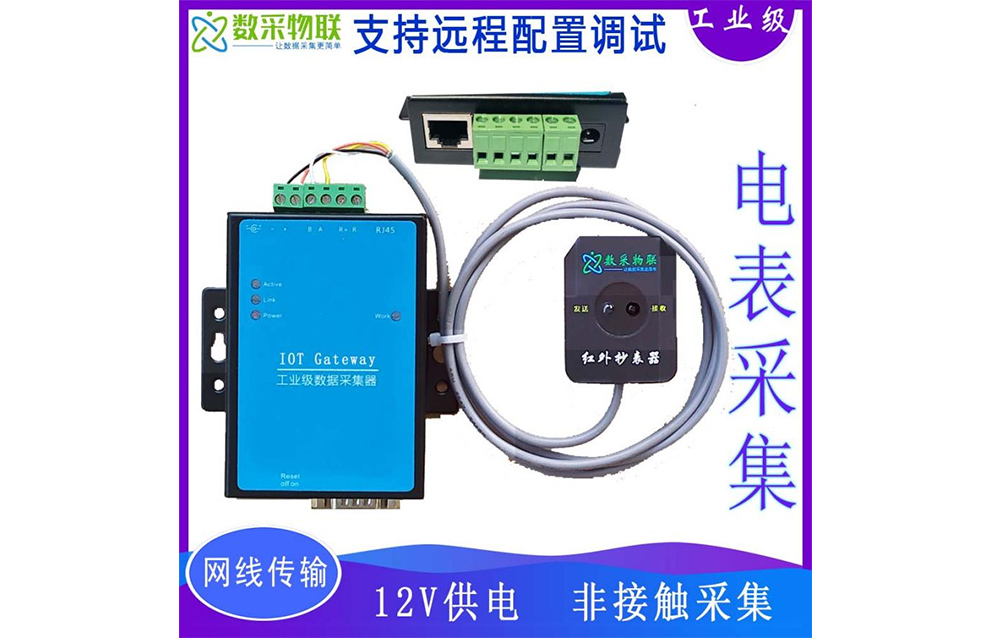
SC-GP-IRLAN Ethernet infrared meter reader is a product launched by Shanghai DAQ IoT Technology Co., Ltd. for the function of converting DLT645 electricity meter acquisition to JSON. It automatically collects data from DLT645 mete…
Get a QuoteProduct Details
1 Product Overview
SC-GP-IRLAN Ethernet infrared meter reader is a product launched by Shanghai DAQ IoT Technology Co., Ltd. for the function of converting DLT645 electricity meter acquisition to JSON. It automatically collects data from DLT645 meters and converts it into JSON format for upload to a cloud server. It supports 1 Ethernet interface and 1 RS485 serial port. The high-quality 9~24V wide-voltage power design provides better adaptability to industrial environments, and the optional DIN-rail mounting accessories are suitable for DIN-rail installation.
3 Executive Standards
“Q/GDW 1365—2013 Technical Specification for Information Exchange Security Authentication of Smart Electricity Meters” — State Grid standard
“Multi-function Electricity Meter Communication Protocol DLT645-2007” — national standard
“Three-phase Smart Electricity Meter Type Specification Q/GDW1356-2013” — State Grid standard
4 Technical Parameters
4.1 Appearance
Interfaces: 485: terminal block; 422: terminal block
Power: center positive, outer negative, standard power socket; two-wire terminal mode
Dimensions: L × W × H = 9.4cm × 6.5cm × 2.5cm
Panel lights: 1. ACT: when the ACT light is green, data is being transmitted normally between Ethernet and RS485. When the ACT light flashes blue, data is returning from RS485 to Ethernet. If the data is relatively short, the blue flash is brief and requires attention. 2. LINK: when the LINK light is green, the RJ45 network cable is properly connected. When the LINK light is blue, a TCP connection is established or it is in UDP mode. 3. POWER: indicates that the serial server is powered on.
4.2 Serial Port Parameters
Baud rate: 1200~115200bps
Parity: none, odd, even, mark, space
Data bits: 5~9
4.3 Environmental Requirements
Operating temperature: -40~85℃
Storage temperature: -45~165℃
Humidity range: 5~95% relative humidity
4.4 Software Parameters
Network protocols: TCP/UDP/ARP/ICMP/DHCP/DNS/HTTP
Communication mode: Socket
User configuration: Windows configuration tool Config tool
5 Core Advantages
-
Simple installation and rapid deployment, helping IoT projects go live quickly
-
Supports full-duplex, high-speed data forwarding without packet loss
-
Non-invasive acquisition, without affecting the normal operation of equipment
-
Comes with the Windows virtual serial port & device management tool Config tool, supporting virtual serial ports, one-click device search and parameter modification
-
Supports JSON-format data upload
6 Data Reporting Communication Protocol
6.1 Protocol Parsing Description
Multiple push methods such as UDP/TCP,
Example JSON data message:
{“Energy”:3456.71}
Message parsing:
{
“Energy”: 3456.71, // total energy, unit kWh
}
Multi-parameter acquisition version data format:
{
“Fflat”: 0, // forward flat energy
“Fpeak”: 28.91, // forward peak energy
“Fsharp”: 105.6, // forward sharp energy
“Ftotal”: 105.15, // forward total energy
“Fvalley”: 23.29, // forward valley energy
“Rflat”: 0, // reverse flat energy
“Rpeak”: 0, // reverse peak energy
“Rsharp”: 0, // reverse sharp energy
“Rtotal”: 0, // reverse total energy
“Rvalley”: 0, // reverse valley energy
“actPower”: 13.715, // total active power
“actPowerA”: 4.524, // phase A active power
“actPowerB”: 0, // phase B active power
“actPowerC”: 9.191, // phase C active power
“currentA”: 40, // phase A current
“currentB”: 70, // phase B current
“currentC”: 50, // phase C current
“fac”: 0.414, // total power factor
“facA”: 0.707, // phase A power factor
“facB”: 0, // phase B power factor
“facC”: 0.707, // phase C power factor
“lastMRtotal”: 0, // last month reverse total energy
“lastMtotal”: 0, // last month forward total energy
“reactPower”: 13.715, // total reactive power
“reactPowerA”: 4.524, // phase A reactive power
“reactPowerB”: 0, // phase B reactive power
“reactPowerC”: 9.191, // phase C reactive power
“volA”: 210, // phase A voltage
“volB”: 221, // phase B voltage
“volC”: 217 // phase C voltage
}
6.2 Protocol Reception Test
Reception testing can be performed with the network debugging assistant NetAssist.
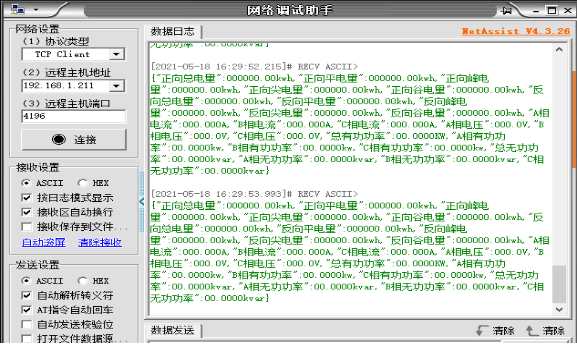
6.3 Protocol Customization
If you need to customize other communication protocols, please contact our sales staff.